This page shows exactly how The Barberrics (The Barberrics LLC) collects consent to send appointment text messages. It is for customers, regulators and mobile carriers who want to check. There are two ways to agree, and both are described in full below. We never text anyone who has not agreed.
1. Online, on the booking form
Direct link to the form: https://thebarberricsbarbershop.com/book. No account or login is needed to see or use any step.
Booking is a four-step form:
- Step 1, "Pick Your Barber": choose a barber.
- Step 2, "Choose Your Service": choose a service.
- Step 3, "Reserve Your Chair": choose a day and time.
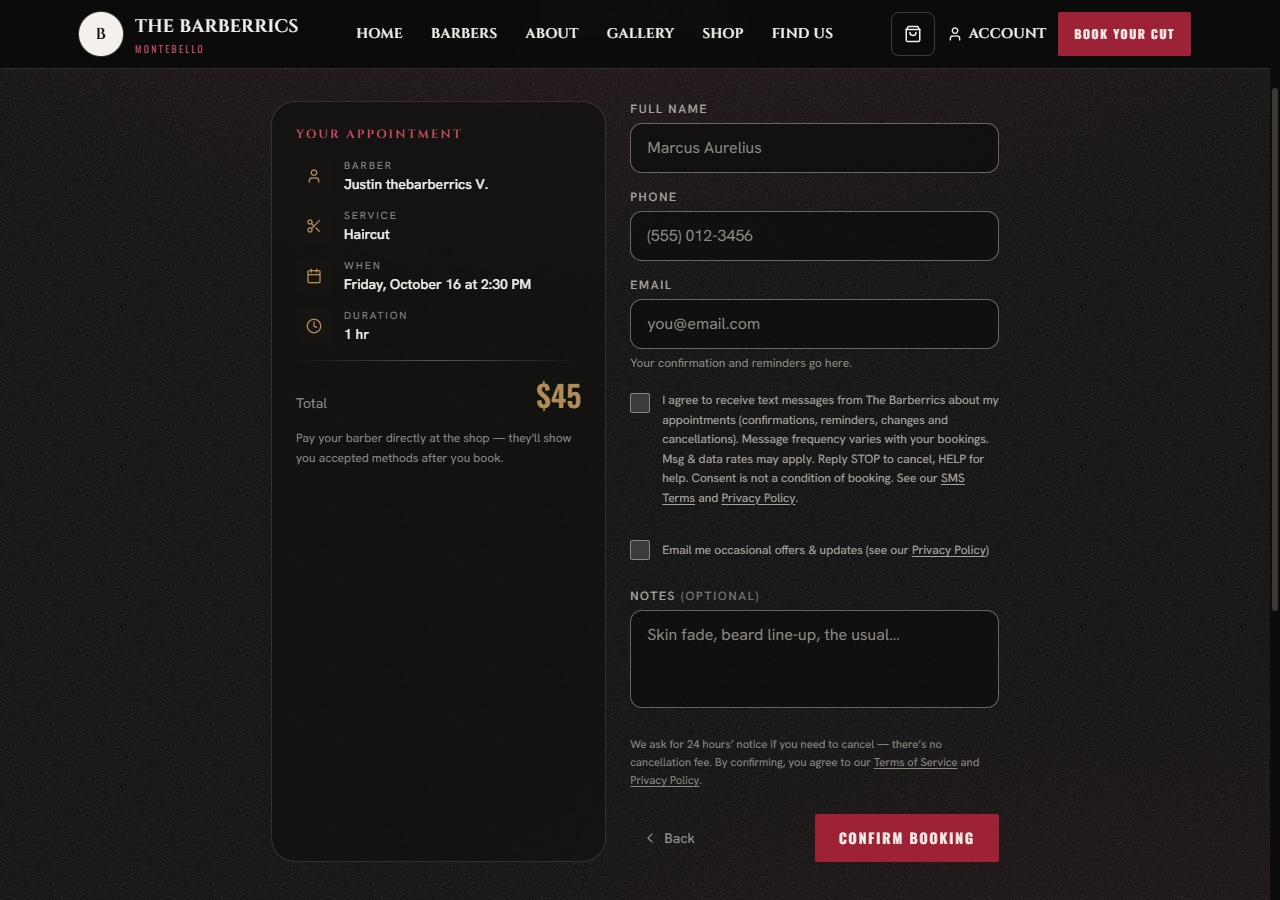
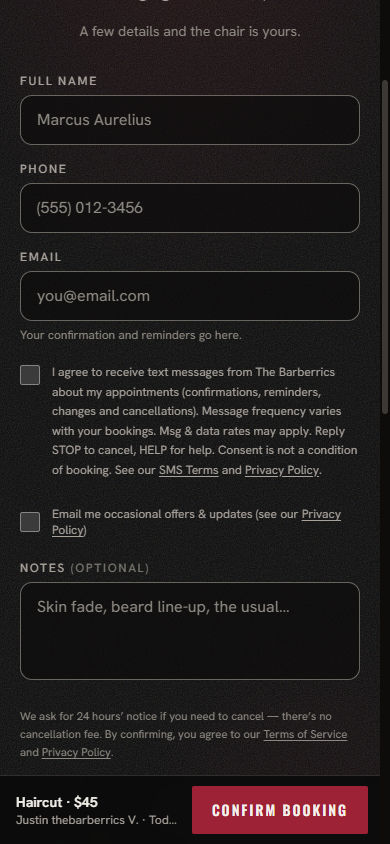
- Step 4, "Lock It In": enter your name, phone number and email, then the text-message checkbox, then the "Confirm Booking" button.
The text-message checkbox is on step 4, so it appears once steps 1 to 3 are done. This is exactly what it looks like and says:
☐ I agree to receive text messages from The Barberrics about my appointments (confirmations, reminders, changes and cancellations). Message frequency varies with your bookings. Msg & data rates may apply. Reply STOP to cancel, HELP for help. Consent is not a condition of booking. See our SMS Terms and Privacy Policy.
What to check:
- The box is never ticked for you. A customer has to tick it themselves.
- Consent is not a condition of booking. Leave the box empty and you can still book. We confirm by email instead.
- The wording names who will text (The Barberrics), what the texts are (confirmations, reminders, changes and cancellations), how often (it varies with your bookings), that message and data rates may apply, how to stop (reply STOP) and how to get help (reply HELP). It links the SMS Terms and the Privacy Policy.
- Photos of step 4 as customers see it: on a computer and on a phone.
2. In person or by phone
When a customer books at the shop or by phone, our staff make the booking for them in our booking console. On the new-booking screen, under the customer's phone number, there is a checkbox labelled Customer agreed to appointment texts. It is unticked by default and cannot be ticked until a phone number has been entered. The screen tells staff: "Only tick this if they said yes out loud."
Staff, speaking for The Barberrics, ask this out loud:
"Would you like us to text you about this appointment? Message frequency varies, message and data rates may apply, and you can reply STOP at any time. Is that OK?"
Staff tick the box only if the customer says yes. If the customer says no, or does not answer, the box stays empty and the appointment is still booked, with no texts.
We record when the customer agreed, how (online, or by staff), and which version of these terms was in effect. A customer who agreed in person can stop at any time by replying STOP to any text, or by asking staff, calling (323) 246-4167 or emailing thebarberrics2020@gmail.com. We stop their texts within one business day.
3. After you agree
- We text about your own appointments only: a confirmation, a notice that a request was received or approved, a reminder, and a notice if the appointment is moved or cancelled. No promotions, no offers.
- Reply STOP to any text to stop all texts. You get one confirmation and then nothing further. Reply START to turn them back on. Reply HELP for help.
- Full terms are in our SMS Terms. How we handle your number is in our Privacy Policy. Your mobile number and your consent are never shared with third parties or affiliates for marketing or promotional purposes.
4. Contact Us
The Barberrics LLC
2515 W. Beverly Blvd, Montebello, CA 90640
Phone: (323) 246-4167
Email: thebarberrics2020@gmail.com
Contact form: https://thebarberricsbarbershop.com/contact